 Gridsense Docs
Datastreams
Send data to Gridsense
POSThttps://api.gridsense.cloud/http/m/<organization>/c/<channel>- Body: message data
- Headers
- Authorization:
Client <device secret> - Content-Type:
application/senml+json
- Authorization:
Where <organization> and <channel> are the IDs of the organization and channel
respectively. Alternatively, the routes can be
used instead.
Note that Gridsense can only store data in the SenML format. However, you may still send data in any format you wish, and have it be parsed by a rule and transformed into a valid SenML array. See create complex data flows with rules for a step-by-step tutorial.
For example, you may send data as plain JSON, then have it go through a rule that parses that JSON data and transforms it into valid SenML array.
In the examples below, we will be sending data that is already structured in SenML.
# Send a message, in SenML format, to a specific channel
curl https://api.gridsense.cloud/http/m/<organization>/c/<channel> \
  --request POST \
  --header 'Content-Type: application/senml+json' \
  --header 'Authorization: Client <device secret>' \
  --data '[{"bn": "org/lighting/SmartLight/", "n": "brightness", "u": "lm", "v": 100}]'
Constraints
For each message object in the SenML array:
- A unique
nfield must be present. - Only one value field must be present (only one of
v,vs,vb,vd). - The fields
bn,u, andtare optional.
Sending data is the first of two steps to store your data in Gridsense. For the sent data to actually be stored and usable across the different Gridsense services, you will need to set up a rule. See create complex data flows with rules for a step-by-step tutorial.
Send batched data to Gridsense
POSThttps://api.gridsense.cloud/http/m/<organization>/c/<channel>- Body: message data
- Headers
- Authorization:
Client <device secret> - Content-Type:
application/senml+json
- Authorization:
In some cases, it might be necessary to send multiple pieces of data at the same time.
# Batch publish two messages, in SenML format, to a specific channel
curl https://api.gridsense.cloud/http/m/<organization>/c/<channel> \
  --request POST \
  --header 'Content-Type: application/senml+json' \
  --header 'Authorization: Client <device secret>' \
  --data '[
  {
    "bn": "org/lighting/SmartLight/",
    "n": "brightness",
    "u": "lm",
    "v": 100
  },
  {
    "n": "power",
    "u": "W",
    "v": 150
  }
]'
The same constraints mentioned in the above section also apply here. See constraints.
Sending data is the first of two steps to store your data in Gridsense. For the sent data to actually be stored and usable across the different Gridsense services, you will need to set up a rule. See create complex data flows with rules for a step-by-step tutorial.
One example where this is useful is when sending the location data of a device, which is used by the Route Map widget to display real-time location updates on an interactive map.
When setting up the widget, you will need to provide the names (bn + n fields
of the SenML objects) of both the latitude and longitude values.
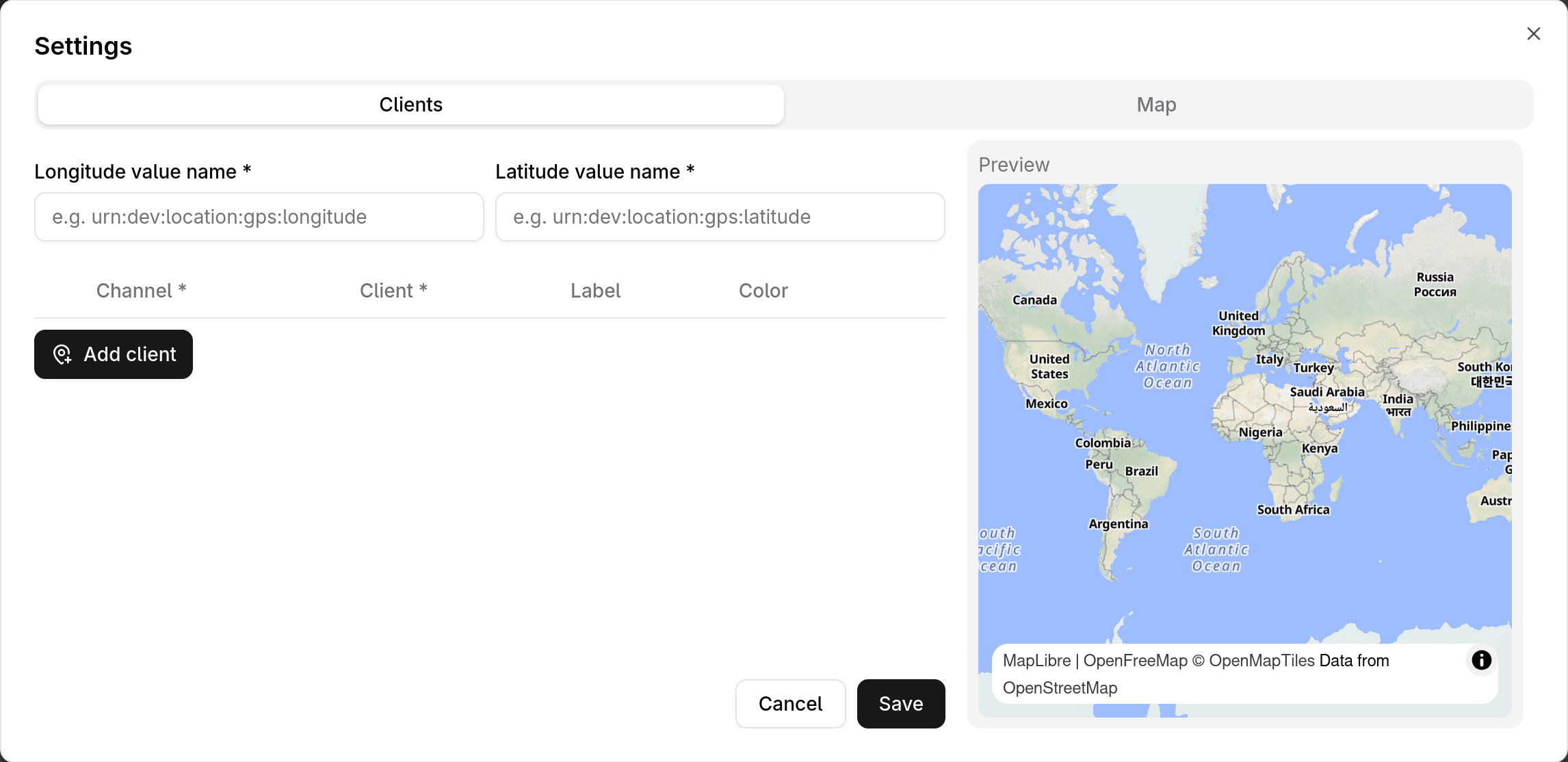
In this case, you could send the device's location data like so:
curl https://api.gridsense.cloud/http/m/<organization>/c/<channel> \
  --request POST \
  --header 'Content-Type: application/senml+json' \
  --header 'Authorization: Client <device secret>' \
  --data '[
    {
        "bn": "urn:dev:location:gps:",
        "n": "longitude",
        "u": "lon",
        "v": 31.50161
    },
    {
        "n": "latitude",
        "u": "lat",
        "v": 34.46672
    }
]'
Then, in the Route Map widget settings, you would fill out the fields "Longitude value name" and "Latitude value name" with "urn:dev:location:gps:longitude" and "urn:dev:location:gps:longitude" respectively.
Get data from Gridsense
GEThttps://api.gridsense.cloud/v1/readers/<organization>/channels/<channel>/messages[?offset=0][&limit=10]- Headers
- Authorization:
Client <device secret>
- Authorization:
Where <organization> and <channel> are the IDs of the organization and channel
respectively. Alternatively, the routes can be
used instead.
The GET endpoint returns messages stored by your organization, not real-time data. The HTTP device API does not provide a mechanism to get real-time data. If real-time data updates are needed, consider using the MQTT device API, WebSocket device API, or CoAP device API instead.
# Read data from a specific channel
curl 'https://api.gridsense.cloud/v1/readers/<organization>/channels/<channel>/messages?limit=10&offset=0' \
  --header 'Authorization: Client <device secret>'
If you're not seeing incoming data, make sure you have set up a rule to process and store incoming data to that specific channel. See create complex data flows with rules for a step-by-step tutorial.
Troubleshooting
My device is sending valid, well-structured SenML data but it's not being stored, displayed in widgets, read by other devices, listed under the channel's messages, etc
Make sure you have set up a rule to save the incoming data. See create complex data flows with rules.